Remote support for practices, with the practice in control.
At the reception desk or in the treatment room, patient records are never far away. With ShareDesk, your IT partner only gets in when someone in the practice says yes, everybody can see that a session is running, and one click ends it. The connection is end-to-end encrypted and operated in Switzerland, which helps you meet your duties under data protection law and professional secrecy.
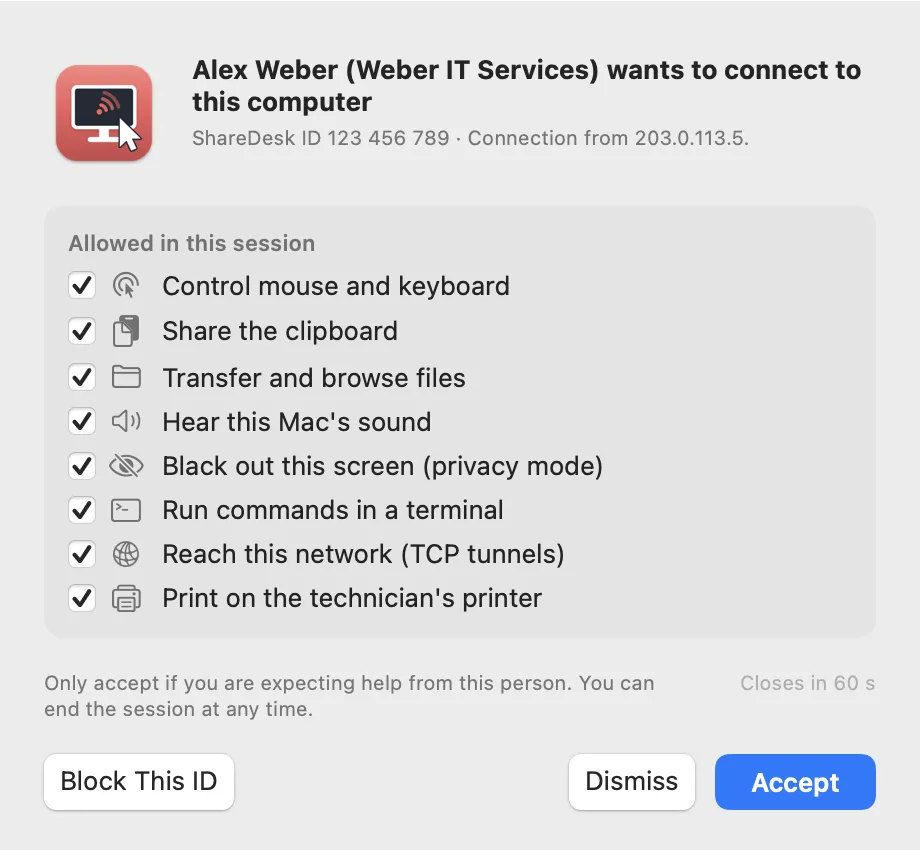
What matters here
Consent before anyone sees the screen
The practice sees the technician's name, company and photo, picks what they may do, from control to files, and accepts. Accepting by accident isn't possible, and unanswered requests close after 60 seconds. The customer decides
Always visible, ended with one click
A banner shows who is connected for as long as the session runs. It hides the screen from the technician or ends the session with one click. The session banner
No hidden recordings
ShareDesk doesn't record sessions by itself. A recording only starts when the technician starts one, the banner then says so, and it's saved on the technician's side, not on our servers. Privacy policy
Privacy mode at the reception
While the technician works, the practice's monitor can turn black so patients at the desk don't see what's happening; pressing Esc three times gives control back. Security and privacy
End-to-end encrypted, operated in Switzerland
Screen, input, files and chat travel encrypted directly between the two computers; our servers in Switzerland only introduce them and never receive the session. Security in detail
Only who you allow
Allow and block lists limit which IDs and addresses may connect, and unattended access needs a password and, if you like, two-factor codes. Limit access
How it works
Your IT partner asks
They connect with the ID of your practice computer, or through an invitation link you received from them.
You decide
You see who is asking and choose what they may do: watch only, control, files and more.
You stay in control
The banner shows the session the whole time. Hide your screen when patient data comes up, or end the session with one click.
Questions
Is ShareDesk certified for medical data?
ShareDesk has no medical or healthcare certification. It gives you the controls that matter for data protection – consent for every session, visible sessions, end-to-end encryption, no recording without notice and a Swiss operator – and so helps you meet your duties; responsibility for patient data stays with the practice.
Does your server see our screen?
No. It only passes on the connection request and the technical details both computers need to find each other. Screen, input, files and chat never pass through it; a relay, when a network needs one, only forwards encrypted data.
Can our IT partner connect when nobody is in the practice?
Only if you set a password for unattended access on that computer. You can require two-factor codes, limit who may connect, have the computer lock itself after the session and remove the access at any time.
What does ShareDesk keep about sessions?
Never their content: screen, files and chat don't pass through our servers. For each connection request the server keeps a record without IP addresses, names or content – which IDs, when, what kind of session and the outcome – for 13 months. Privacy policy
Try it on your next support call.
Free for private use. For work: USD 18 per technician and month, billed yearly, excl. VAT. The people you help never pay.